Most laptops that die from a drink do not die from the drink. They die two days later, from corrosion creeping along a ribbon connector, or from a repair shop that powered the board up “to check” while moisture was still sitting under the shield cans. The liquid is the event; the corrosion is the injury, and the injury is what the first ten minutes decide.
What follows is a sequence, in the order you should do it. It assumes a small spill — a glass, a cup of tea, a knocked bottle — on a machine you can still pick up. If the laptop is already dead, hissing, or smoking, unplug it from the wall, do not touch the wet parts, and take it outside to a non-flammable surface before anything else.
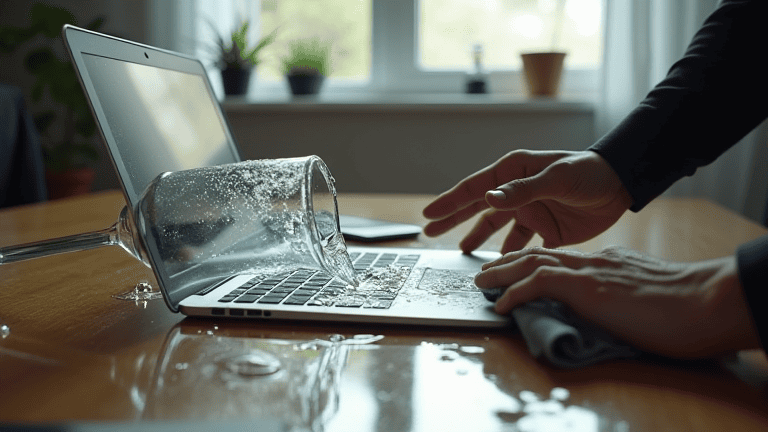
Why spilled liquid on a laptop is a corrosion problem, not a wetness problem
Water alone is a poor conductor. What conducts is water plus the salts, sugars and acids dissolved in it, and what destroys is the electrochemistry that starts the moment that mixture bridges two powered traces at different voltages. Current flows where it should not, thin metal migrates, and copper turns green and brittle. Sugar drinks are worse than water because they leave a sticky residue that keeps pulling moisture out of the air long after the surface feels dry; coffee adds acidity; anything carbonated adds both.
The practical consequence is that drying is not the goal. Stopping current through a wet board is the goal, and then removing the residue before it eats anything. Corrosion is a well-understood process with a simple countermeasure: no power, no electrolyte, no damage — see the general mechanism on this corrosion reference.
Minute zero: kill the power instead of shutting down politely
Do not save your work. Do not click shutdown. Hold the power button until the machine cuts out, then pull the charger out of the wall and out of the laptop. A clean shutdown takes thirty to sixty seconds during which the board is still powered and the liquid is still spreading; a hard cut costs you an unsaved document and possibly a filesystem check, which is a trivial price next to a shorted rail.
If the laptop has an easily removable battery — older models with a latch, or a battery you can slide out from the bottom — take it out immediately. That single step removes the largest source of current and turns a potential short into a wet piece of hardware that can be cleaned.
Minute one to three: tilt and drain before you wipe
Pick the machine up and hold it the way you would hold a wet book: hinge high, keyboard deck angled down toward the front edge, so anything pooled on the keys runs off the front lip instead of down through the key openings. Hold it there for a minute. Blot the surface with a dry cloth or paper towel, working outward from the spill, and change the cloth when it stops absorbing.
Do not tip it toward the hinge or the vents. Under the hinge sits the display cable and, on many thin models, the cooling assembly; the vents lead straight into the fan shroud and then across the mainboard. Gravity is your ally only if you point it at the exit.
Minute three to five: the four habits that turn a spill into a write-off
- Rice. A bowl of rice does nothing for liquid already inside a sealed aluminium chassis, and the starch dust that finds its way in is a new problem. Skip it.
- A hair dryer, especially on hot. Heat warps keycaps and can push moisture deeper while evaporating the surface, which makes the machine feel dry while it is still wet where it matters.
- Shaking or slapping it. This spreads the liquid across areas that were dry and can fling droplets onto the display’s backlight sheet through the hinge gap.
- Powering it on to “see if it still works”. This is the single most expensive habit on the list. Every test boot is a fresh chance to short a rail. If you must know, wait two full days.
Minute five to ten: open the bottom cover if you are comfortable doing it
With the machine off, unplugged and, if possible, battery-free, the best thing you can do in the first ten minutes is get air to the wet area. On most modern laptops that means a handful of screws and a plastic pry tool. Work slowly around the seam, lift the cover straight up, and if the battery connector is a plug on the board, disconnect it before anything else — that is the step that actually stops the current.
Once it is open, look for the wet trail. Liquid follows the easiest path: through the keyboard membrane, down the inside of the palm rest, across the board toward the lowest point. If you can see droplets or a damp sheen, blot them with a lint-free cloth or a cotton swab. Do not scrub, do not spray contact cleaner into a powered assembly, and do not start removing heat sinks or shield cans unless you have done it before — the risk of a torn ribbon cable is higher than the risk from a little residue.
If the spill was water and you caught it within a minute, cleaning is often unnecessary once it is dry. If it was sweet, milky or alcoholic, the residue needs isopropyl alcohol and a proper clean, and that is a job for someone with the right tools. Photograph what you see before you touch it; those photos are useful if you later claim on a warranty or home contents policy.
The next 48 hours: drying, and the honest odds
Leave the cover off, the battery disconnected, and the machine somewhere with moving air at room temperature — a desk near a window with a fan pointed past it, not at it. Forty-eight hours is the minimum for a real spill. Thin machines with glued batteries and dense boards hold moisture in places you cannot see, and the failure often shows up as an intermittent fault: a key that double-types, a trackpad that ghosts, a USB port that works only when the machine is warm.
If you have to use the laptop before then and you have a second machine, treat the wet one as a data source, not a computer: pull the drive, put it in an enclosure, copy what you need. Our guide to what to do when your phone gets wet explains the same principle for a device with even less room to dry.
If it does not come back: get the data out before the repair
A laptop that will not POST after a spill still usually has an intact drive. Before you hand the machine to anyone, remove the SSD if it is socketed (M.2 drives are one screw) and copy your files onto another computer or an external disk. If the drive is soldered, ask the shop to image it before they start board-level work, and get that in writing.
Then decide honestly whether the repair is worth it. A keyboard replacement on a spill-damaged machine is often reasonable; a mainboard replacement usually costs more than the machine is worth, and the corrosion may already have reached the charging circuit. A shop that quotes a board swap without inspecting for corrosion is quoting a guess.
Whatever the outcome, do the boring thing next: a current backup that runs without you remembering it. If you have been meaning to set one up, this backup routine is a good place to start, and it costs nothing compared with the machine you nearly lost.
Stopping the next spill
The fix is not “be more careful”. It is physical: put drinks on a different surface from the laptop, on the far side of the desk from the hinge, in a cup with a lid if you drink at the keyboard at all. Keep the laptop on a stand that lifts it above the desk surface so a spill runs under it rather than into it. And keep the machine out of the humid season’s worst corners — if your area has months of high humidity, the same moisture that ruins a spill repair will quietly work on a dry machine’s connectors, which is what protecting electronics from humidity is about.
Ten minutes of the right actions, then two days of patience, decides whether a spill is an anecdote or a bill. The order matters more than the equipment, and the only genuinely irreversible mistake is pressing the power button to find out.